
In short: You get signed out when the cookie that remembers you is deleted or never saved. The usual reasons: Chrome deletes site data on close, an extension clears cookies, third-party cookies are blocked for a sign-in that needs them, or the site itself ends sessions. Keep a short list of protected sites and most of it goes away.
Check these first
| Cause | How to tell | Fix |
|---|---|---|
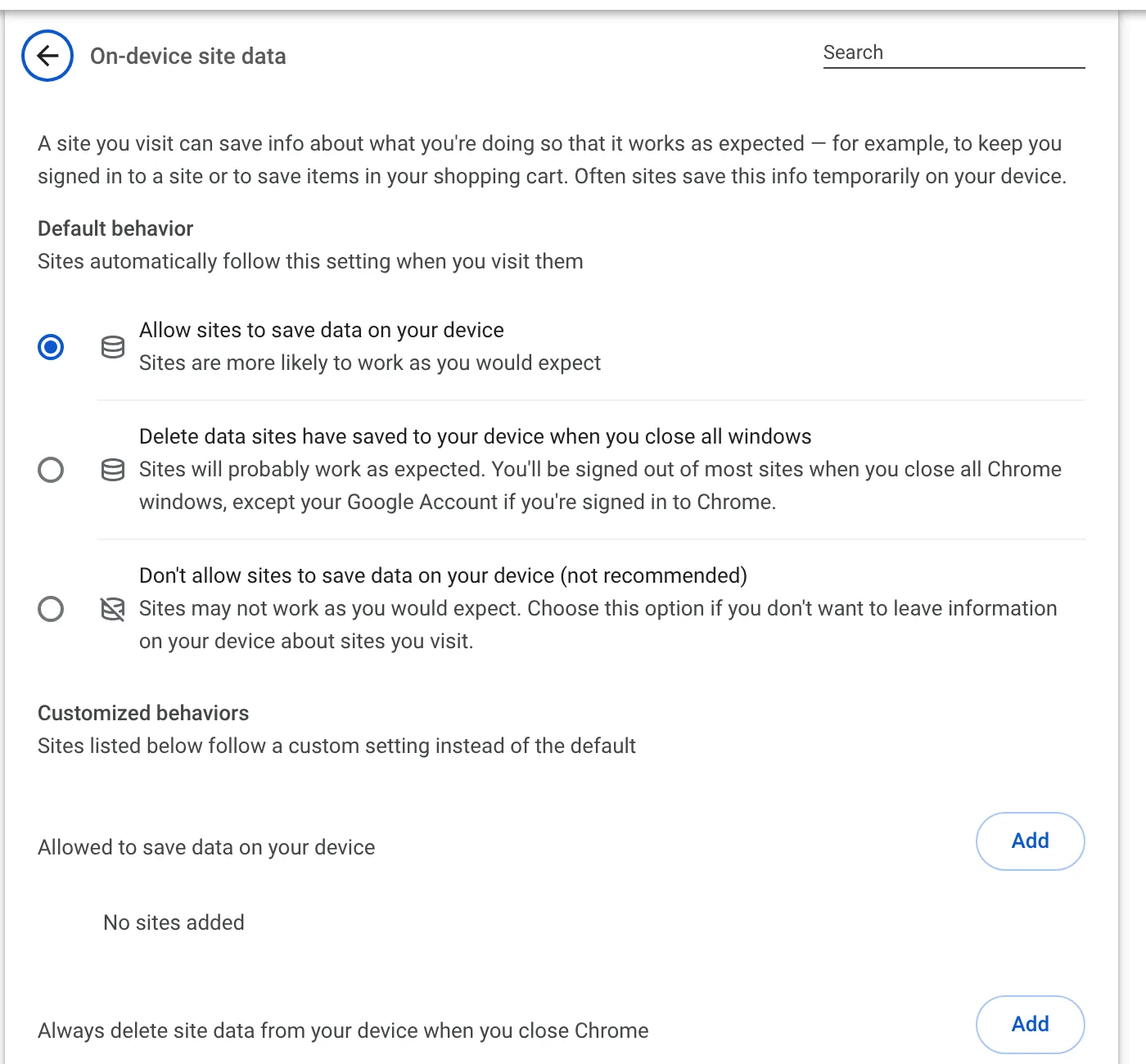
| Chrome deletes site data on close | Signed out after every restart | Turn it off, or add exceptions for your sites |
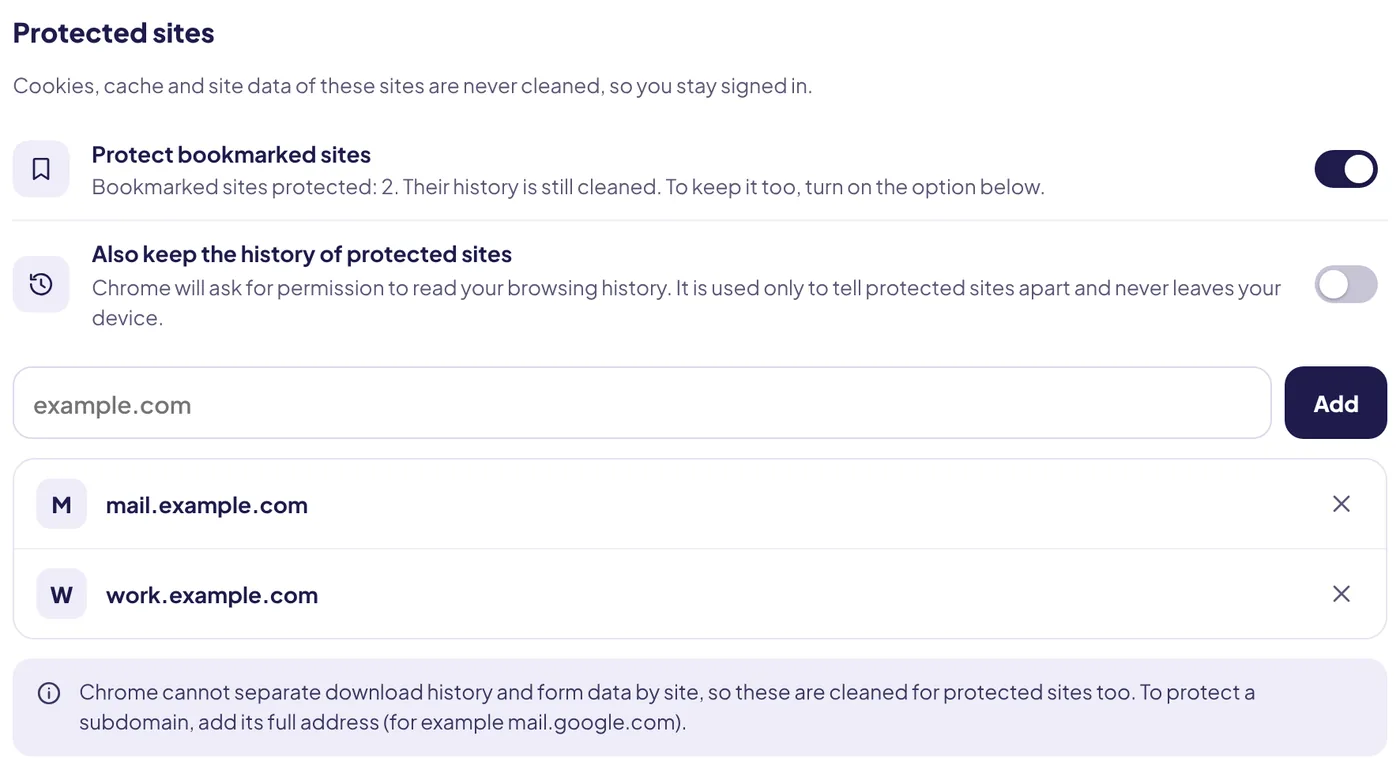
| A cleaner extension removes cookies | Signed out after each automatic cleaning | Add the site to protected sites |
| Third-party cookies blocked | Only "Sign in with…" buttons or embedded logins fail | Allow third-party cookies for that site |
| The site ends sessions itself | Signed out after a fixed time even with cookies kept | Tick "Remember me"; some banks never allow it |
| Your network or IP changed | Security check or sign-in prompt after travel or VPN | Normal; sign in again |
Chrome's own setting
Under Privacy and security → Site settings → Additional content settings → On-device site data, Chrome has an option to delete data sites saved when you close all windows. If it is on, every restart signs you out. Either switch back to Allow sites to save data on your device, or add your sites under Allowed to save data on your device.
Cleaner extensions
Any tool that clears cookies will sign you out, that is the point. A good one lets you choose which sites to keep. In Auto History Wipe, add a site to Protected sites, or switch on Protect bookmarked sites to keep every site in your bookmarks.
Third-party cookie blocking
If you blocked third-party cookies, most sites still work, but some sign-in flows that pass you between two domains can fail. Add the site that breaks as an exception rather than turning blocking off.
Still signed in to Google after cleaning?
That is the opposite problem, and it has a different cause: Chrome restores your Google sign-in if you are signed in to Chrome itself. Chrome sync and your history explains why.
Sync turns itself off too?
If Chrome sync pauses every time you restart, the cause is usually the same. Google's sync troubleshooting page says to go to Privacy and security → Site settings → Additional content settings → On-device site data and turn on Allow sites to save data on your device. Sync relies on your Google sign-in, which is a cookie like any other.
Signed out after an update or a new device
- A security update or password change on the site itself can end all sessions on purpose. Signing in once fixes it.
- Your bank or email may sign you out after a period of inactivity, whatever your browser does. That is a site rule, not a cookie problem.
- VPNs that change your location can trigger extra sign-in checks on some sites.
A two-minute check
- Open one site that keeps signing you out and sign in.
- Close Chrome completely and open it again.
- If you are signed out, check the on-device site data setting and any cleaner extensions.
- If you are still signed in, the problem is the site's own timeout. There is nothing to fix in Chrome.
The bottom line
Most surprise sign-outs come from cookies being deleted, by Chrome's close-all-windows setting, an extension or a cookie block. Allow cookies for the sites you need, or protect them in your cleaner, and they will stay signed in.
Questions and answers
Why does Chrome sign me out of everything when I close it?
Probably because the setting to delete site data when all windows close is on. Turn it off or add exceptions.
Does clearing history sign me out?
No. Only clearing cookies and site data does.
Why does my bank sign me out after a few minutes?
Banks end sessions on purpose for security. No browser setting changes that.
Sources
The official help pages behind this guide. Chrome moves menus around between versions; if yours looks different, these pages show the current steps.